webpack学习记录

最近在学习webpack3.0特记录一下

目录结构:
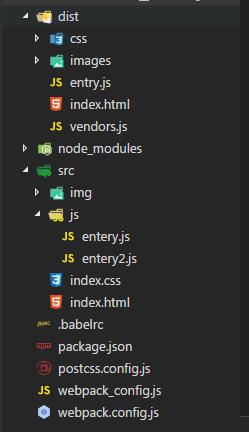
目录结构
dist : 打包后的文件了存储路径,在上线时提供的项目目录
node_modules : 开发时依赖和插件安装目录,node提供
src : 开发时代码编辑区
.babelrc: babel 配置
package.json :node依赖包
postcss.config.js:css前缀配置文件
webpack_config.js : 单独提出的webpack配置文件
webpack.config.js:webpack工程配置文件

package.json

1
2
3
4
5
6
7
8
9
10
11
12
13
14
15
16
17
18
19
20
21
22
23
24
25
26
27
28
29
30
31
32
33
34
35
36
37
38
39

{
"name": "webpack_demo",
"version": "1.0.0",
"description": "",
"main": "index.js",
"scripts": {
"test": "echo \"Error: no test specified\" && exit 1",
"server": "set type=dev&webpack-dev-server",
"dev": "set type=dev&webpack",
"build": "set type=build&webpack"
},
"author": "",
"license": "ISC",
"devDependencies": {
"autoprefixer": "^7.1.5",
"babel-core": "^6.26.0",
"babel-loader": "^7.1.2",
"babel-preset-env": "^1.6.0",
"babel-preset-es2015": "^6.24.1",
"babel-preset-react": "^6.24.1",
"css-loader": "^0.28.7",
"extract-text-webpack-plugin": "^3.0.1",
"file-loader": "^1.1.5",
"html-webpack-plugin": "^2.30.1",
"html-withimg-loader": "^0.1.16",
"postcss-loader": "^2.0.7",
"purify-css": "^1.2.5",
"purifycss-webpack": "^0.7.0",
"style-loader": "^0.19.0",
"url-loader": "^0.6.2",
"webpack": "^3.7.1",
"webpack-dev-server": "^2.9.1"
},
"dependencies": {
"jquery": "^3.2.1",
"vue": "^2.5.2"
}
}

webpack.config.js 文件内容

1
2
3
4
5
6
7
8
9
10
11
12
13
14
15
16
17
18
19
20
21
22
23
24
25
26
27
28
29
30
31
32
33
34
35
36
37
38
39
40
41
42
43
44
45
46
47
48
49
50
51
52
53
54
55
56
57
58
59
60
61
62
63
64
65
66
67
68
69
70
71
72
73
74
75
76
77
78
79
80
81
82
83
84
85
86
87
88
89
90
91
92
93
94
95
96
97
98
99
100
101
102

const path = require('path'); //node 字段的path处理方法苦
const uglify = require('uglifyjs-webpack-plugin');//JS压缩打包
const htmlPlugin= require('html-webpack-plugin');//html打包
const extractTextPlugin = require("extract-text-webpack-plugin");//图片分离
const glob = require('glob');
const PurifyCSSPlugin = require("purifycss-webpack");//消除未使用的CSS
const entry = require("./webpack_config");
const webpack = require('webpack');
if(process.env.type== "dev"){
var website={
publicPath:"http://localhost:2232/"//本地环境
}
}else{
var website={
publicPath:"http://cdn.jspang.com/"//线上环境生产环境
}
}
console.log(website.publicPath)
console.log('-------------------------')
module.exports={
devtool: 'eval-source-map',//开发阶段这是一个非常好的选项,在生产阶段则一定要不开启这个选项。
//入口文件的配置项-配置入口文件的地址,可以是单一入口,也可以是多入口。
//这个选项就是配置我们要压缩的文件一般是JavaScript文件
entry:entry.path,
//出口文件的配置项-配置出口文件的地址,在webpack2.X版本后,支持多出口配置。
//出口配置是用来告诉webpack最后打包文件的地址和文件名称的
output:{
path:path.resolve(__dirname,'dist'),//获取了项目的绝对路径
filename:'[name].js',
publicPath:website.publicPath
},
//模块,例如解读CSS,图片如何转换,压缩 -配置模块,主要是解析CSS和图片转换压缩等功能。
module:{
rules:[
{
//CSS和引入做好后,我们就需要使用loader来解析CSS文件了,这里我们需要两个解析用的loader,分别是style-loader和css-loader。
test:/\.css$/,
use:extractTextPlugin.extract({
fallback:"style-loader",
use:[
{ loader: 'css-loader', options: { importLoaders: 1 } },
'postcss-loader'//css自动加前缀
]
})
},
{
test:/\.(png|jpg)/,
use:[{
loader:'url-loader',
options:{
limit:5000,
outputPath:'images/'//配置我们的url-loader选项使图片放到特定的文件夹
}
}]
},
{
test:/\.(htm|html)$/,//解决的问题就是在hmtl文件中引入<img>标签的问题。
use:['html-withimg-loader']
},
{
test:/\.(jsx|js)$/,
use:{
loader:'babel-loader'
},
exclude:/node_modules/
}
]
},
//插件,用于生产模板和各项功能-配置插件,根据你的需要配置不同功能的插件。
plugins:[
new webpack.ProvidePlugin({ //全局引入插件
$:"Jquery"
}),
new webpack.optimize.CommonsChunkPlugin({
name:"vendors"
}),
// new uglify(), //开启JS压缩
new htmlPlugin({
//是对html文件进行压缩,removeAttrubuteQuotes是却掉属性的双引号。
minify:{
removeAttributeQuotes:true
},
//hash:为了开发中js有缓存效果,所以加入hash,这样可以有效避免缓存JS。
hash:true,
//template:是要打包的html模版路径和文件名称。
template:'./src/index.html'
}),
new extractTextPlugin('/css/index.css'),//这里的/css/index.css是分离后的路径位置
new PurifyCSSPlugin({
paths: glob.sync(path.join(__dirname, 'src/*.html')),
})
],
//配置webpack开发服务功能
//webpack3.6后默认支持热跟新
devServer:{
contentBase:path.resolve(__dirname,'dist'),//配置服务器基本运行路径,用于找到程序打包地址。
host:'localhost',//服务运行地址,建议使用本机IP,这里为了讲解方便,所以用localhost。
compress:true,//服务器端压缩选型,一般设置为开启,如果你对服务器压缩感兴趣,可以自行学习。
port:2232//服务运行端口,建议不使用80,很容易被占用,这里使用了2232.
}
}

postcss.config.js

1
2
3
4
5
module.exports = {
plugins: [
require('autoprefixer')
]
}

webpack_config.js

1
2
3
4
5
6
7
8
9

const entry = {};

entry.path = {
entry:'./src/js/entery.js',
vendors:['jquery']
}

module.exports = entry;

.babelrc

1
2
3
4

{
"presets":["react","env"]
}

如果对您有所帮助或者对博主有更多的话说,欢迎你去我的GitHub留下一个您的start和issues

前往LEE的github给他一个Start鼓励一下吧

此教程学习地址:http://jspang.com/2017/09/16/webpack3-2/